SYNC

Take control of your booking availability

Keep your booking channels connected without the headache of managing them manually.

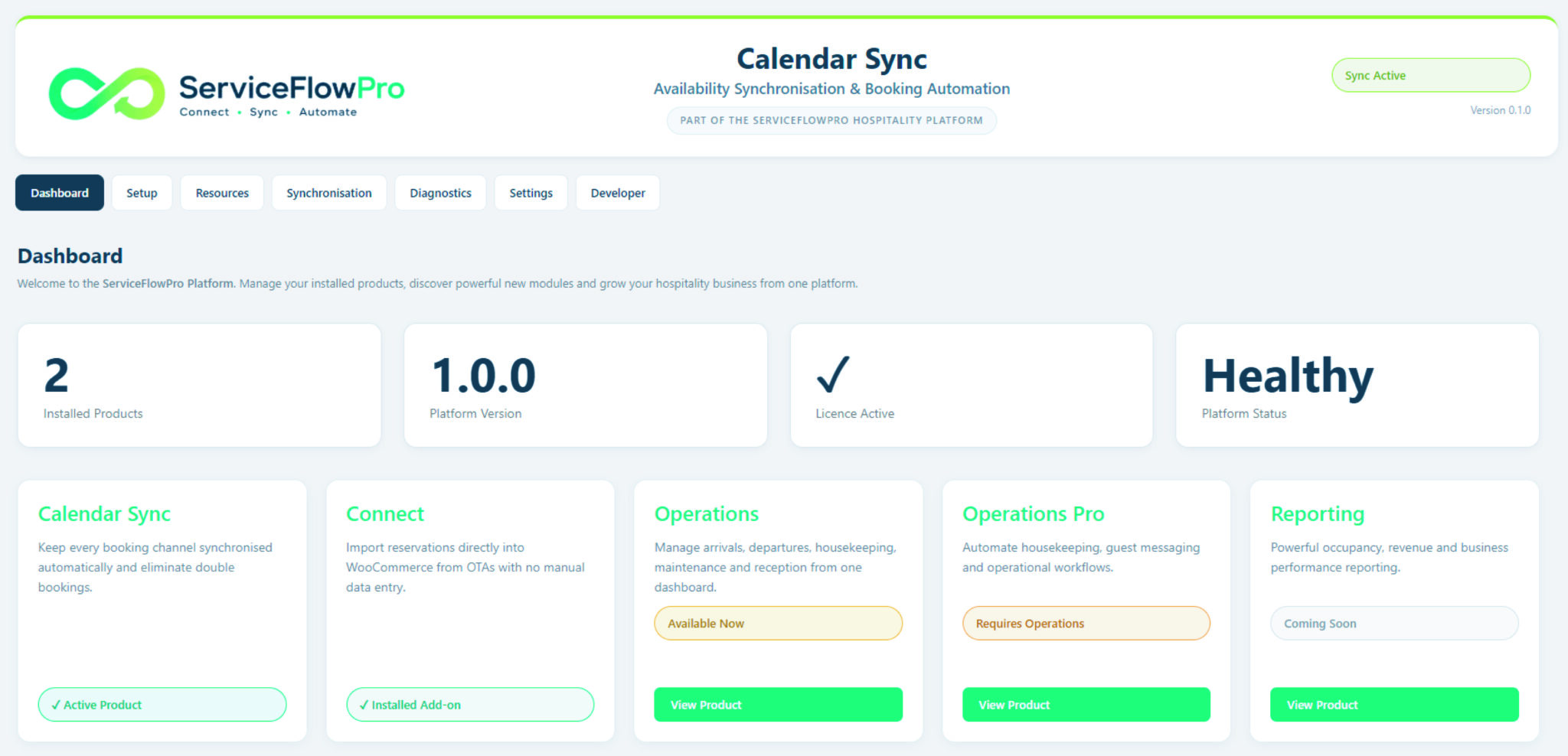
ServiceFlowPro Sync synchronises availability between your WooCommerce booking system and connected booking channels, helping prevent conflicting reservations and reducing the administration involved in managing multiple calendars.

Whether you use third-party booking platforms alongside your own website, or are gradually moving towards a more direct booking model, Sync lets you keep your existing channels connected while keeping your own WooCommerce system at the centre of your business.

£49 / month · 7-day free trial

Sync Module

ServiceFlowPro Sync keeps your booking availability synchronised across connected booking channels, helping prevent double bookings…


£49.00 / month with a 7-day free trial Add to cart

SET UP WITHOUT BEING A DEVELOPER

Connecting booking calendars can involve providers, resources, feeds, booking types and mapping between completely different systems.

ServiceFlowPro Sync handles much of that complexity for you.

Our guided setup wizard takes you through the process step by step, helping you discover your booking provider, identify the booking types and resources available, connect your calendars and configure your synchronisation settings.

You don’t need to understand APIs, calendar feeds or complicated technical configuration to get started.

The setup wizard guides you through:

1. Choose your booking provider
Select the platform you want to connect and enter the required connection details.

2. Discover your booking types
ServiceFlowPro identifies the booking types and resources available from your connected provider.

3. Discover your resources
Find the pitches, rooms, units or other bookable resources available to your system.

4. Map your resources
Our intelligent mapping system helps match the resources from your external booking platform with the corresponding WooCommerce resources.

5. Configure synchronisation
Choose how your calendars should work together and configure the synchronisation settings for your business.

6. Check your connection
Use the built-in connection and diagnostics tools to confirm everything is working correctly before you rely on the connection.

7. Activate Sync
Once everything has been checked, activate the connection and let ServiceFlowPro handle the ongoing synchronisation.

No complicated configuration. No guesswork. No developer required.

Connect Module

Connect ServiceFlowPro Connect brings reservations from supported third-party booking platforms into your WooCommerce booking system,…

£50.00 / month with a 7-day free trial Add to cart

INTELLIGENT RESOURCE MAPPING

Our intelligent auto-mapping system does the hard work for you.

One of the most difficult parts of connecting different booking systems is making sure that the right resources are connected to each other.

A resource might be called one thing in your booking platform and something completely different in WooCommerce.

ServiceFlowPro’s automatic mapping system is designed to discover the available products, booking types and resources and help establish the correct relationships between them.

Instead of manually working through every calendar and trying to determine which resource belongs to which WooCommerce booking, ServiceFlowPro helps you identify what is available and what needs to be connected.

From external booking resource → to your WooCommerce resource.

Once your mapping is configured, ServiceFlowPro can use those relationships to keep availability synchronised between the connected systems.

Less manual configuration. Fewer opportunities for mistakes. A much easier setup.

Connect Module

Connect ServiceFlowPro Connect brings reservations from supported third-party booking platforms into your WooCommerce booking system,…

£50.00 / month with a 7-day free trial Add to cart

KEEP YOUR AVAILABILITY IN SYNC

One booking can change everything.

When you’re selling the same accommodation, pitch, room or resource through multiple booking channels, availability needs to change when a reservation is made.

Without reliable synchronisation, you’re left checking calendars, updating availability and hoping that nothing gets missed.

Sync keeps connected calendars aligned automatically.

When availability changes through a connected channel, the relevant calendar information can flow through your configured connections, helping keep availability consistent and reducing the risk of accepting conflicting reservations.

The result?

Less calendar administration.
Fewer manual updates.
Less risk of double bookings.
More confidence in your availability.

WooCommerce ↔ External booking channel

One booking can change everything.

Two-way synchronisation. One connected booking system.

ServiceFlowPro Sync keeps availability moving in both directions between your WooCommerce booking system and connected booking channels.

When availability changes in one system, Sync can pass that change through the configured connection so your other booking channels remain up to date.

No constantly checking calendars. No manually blocking availability. No copying changes from one platform to another.

WooCommerce → Booking Channel

Availability changes made through your own booking system are pushed through to connected channels.

Booking Channel → WooCommerce

Availability changes received from connected booking channels are brought back into your WooCommerce booking system.

Bookings change →Sync keeps up.

New bookings, amendments and cancellations are synchronised across your connected booking calendars, helping keep availability accurate as reservations change.

Connect Module

Connect ServiceFlowPro Connect brings reservations from supported third-party booking platforms into your WooCommerce booking system,…

£50.00 / month with a 7-day free trial Add to cart

WORK WITH YOUR EXISTING BOOKING CHANNELS

You don't have to abandon third-party platforms.

ServiceFlowPro isn’t about forcing you to change how your business operates overnight.

If platforms such as Airbnb, Booking.com, Pitchup or other connected booking channels generate valuable bookings for your business, you can continue using them.

Sync allows those channels to work alongside your own WooCommerce booking system.

That means you can:

  • Continue using third-party channels where they work for you
  • Keep your own website and WooCommerce booking system at the centre
  • Synchronise availability between connected calendars
  • Reduce your dependence on manual calendar management
  • Gradually move towards a more direct booking strategy

Use the platforms that bring you bookings — without allowing them to control your entire booking operation.

KNOW WHAT'S CONNECTED

Built-in tools to check your connections.

You shouldn’t have to wonder whether a booking connection is working.

ServiceFlowPro provides dedicated areas within the Sync module to help you understand what is connected, what has been mapped and whether your synchronisation system is operating correctly.

Connection & synchronisation tools

Connection checking
Check the status of your configured connections and identify potential issues.

Resource mapping
See how external resources relate to your WooCommerce resources.

Synchronisation controls
Review and manage how your connected calendars are synchronised.

Diagnostics
Investigate connection and synchronisation issues without having to dig through complicated server logs.

Synchronisation logs
See what the system has been doing and use the available information when troubleshooting.

Connect Module

Connect ServiceFlowPro Connect brings reservations from supported third-party booking platforms into your WooCommerce booking system,…

£50.00 / month with a 7-day free trial Add to cart

YOUR BOOKING SYSTEM. YOUR DATA. YOUR CONTROL.

Build towards a more independent booking operation.

Third-party booking platforms can be incredibly valuable for attracting customers.

But the long-term goal doesn’t have to be dependence on them.

With ServiceFlowPro Sync, you can keep using external platforms while building your own WooCommerce booking operation alongside them.

Over time, that can give your business a more direct relationship with its customers and greater control over how bookings are managed.

And when you combine Sync with ServiceFlowPro Connect, third-party reservations can go beyond calendar synchronisation and become part of your WooCommerce booking workflow.

Sync gives you the connection.
Connect takes the next step.

Connection & synchronisation tools

Connection checking
Check the status of your configured connections and identify potential issues.

Resource mapping
See how external resources relate to your WooCommerce resources.

Synchronisation controls
Review and manage how your connected calendars are synchronised.

Diagnostics
Investigate connection and synchronisation issues without having to dig through complicated server logs.

Synchronisation logs
See what the system has been doing and use the available information when troubleshooting.

WHY SERVICEFLOWPRO SYNC?

Save time, save money!

Less administration

Spend less time checking and updating multiple booking calendars manually.

Fewer errors

Reduce the opportunity for availability and booking information to be entered incorrectly.

Reduced double-booking risk

Keep connected availability synchronised to help prevent conflicting reservations.

Easier setup

Use the guided setup wizard instead of wrestling with complicated technical configuration.

Intelligent mapping

Discover and map available booking resources to the appropriate WooCommerce resources.

Built-in diagnostics

Check connections and investigate synchronisation issues from within the product.

Works with your existing channels

Continue using third-party booking platforms while bringing more control back to your own WooCommerce system.

Built for WooCommerce

Keep your own website and booking system at the heart of your operation.

ServiceFlowPro

One WooCommerce system. Multiple booking channels. Less administration.

Whether you're looking to reduce your reliance on third-party platforms or simply make them easier to manage, ServiceFlowPro gives you the tools to bring more of your booking operation together in WooCommerce.

Sync

Keep availability and bookings synchronised automatically across connected calendars.

Connect

Bring bookings from connected platforms directly into WooCommerce.

Operations

Manage arrivals, departures, check-ins and daily operations from one dashboard.

Operations Pro

Automate operational workflows and guest communications.